Desktop Computers Destined for the Scrapheap?

The IBM Personal Computer (PC) was thirty years old last Friday, and according to those in the know, it might not be around for much longer. A blog post by Dr Mark Dean, one of IBM’s longest serving and most respected computer designers (who helped build the classic IBM 5150) has been making big waves across the technology sector after he claimed that the PC was heading in the same direction as vinyl records and the typewriter, light bulbs and the vacuum tube.

Dr Dean points out that PC’s and cheap laptops have had their time and place but that now they have helped to create a world which needs a new type of device depending on use and form.

Claiming that he himself has moved beyond the PC and only works on a tablet, he notes that PC’s will still be around a while longer but that “they’re no longer at the leading edge of computing.”

He goes on to say that it will not only be tablets and phones that cause the demise of PC’s but also a change of mindset about the place of computing in society and the progress of man. Instead of being about computing they are now a way of facilitating innovation not on the devices themselves, but “in the social spaces between them, where people and ideas meet and interact.”

When IBM released the 5150 in 1981 it soon set the standard for how PC’s were to look and operate. The computer, which had a massive 16k of ram and cost more than $1,500 was one of the computers that began the ‘PC Era’, that revolutionized the way we work and live.

An IBM 5150 PC

An IBM Personal Computer (IBM 5150)

According to Dean, such a revolution is also underway once again. He is not alone – in another blog about the 30th anniversary of the PC, Microsoft’s Frank Shaw argued that the proliferation of tablets, phones and other such devices was the beginning of a new ‘PC Plus Era’, if not necessarily an indication of the end of the PC and traditional computer devices.

So what do you think? Are you ready to ditch that PC just yet?

Technology and immigration

I find myself in Boston in the US today, after a long couple of flights. Milan to Dublin wasn’t long but I only had an hour for the connection in Dublin, and in Milan they could not print my boarding cards so I had to go through a sort of check in process again – and it took ages.

First I queued up for 20 minutes to get my boarding card, no problem. Than I had to go through US clearance, new to me, but do what the man says when at the airport I always say. An incredibly long and arduous process of form filling in a hurry, through the body scanner, fingerprints, mug shot, another body scanner without shoes, constant race against time, very stressful (with 2 small children) and finally to the plane 2 minutes before leaving. Oh but it didn’t leave. We had to wait for the other late arrivers to get US clearance, so we waited 45 minutes on a full Airbus for the last few people.

A flexible border?

Something struck me at the time, the security personnel were all American and the stars and stripes were everywhere. Then the strangest thing. We arrived in Boston and we didn’t have to clear customs or show our passports! In fact we came in through the domestic arrivals terminal and the person waiting for us was in the wrong place.

Then it struck me, we had come on a domestic flight over the Atlantic. The US border has moved, it now takes in part of Dublin airport!

The technology was incredible, I had to identify my bags on a photo as they were being loaded onto the plane, and they have all the information they need about me.

But just because the possibility exists and technological advancements mean that the border can move and information can be sent in real time to the rightful authorities does a state (the most powerful state in the world) have the right to use it in this way? And what about the political implications? I suspect that the Tajikistan government would find themselves in difficulty during the negotiation process if they wanted to enforce a similar line.

Rule Britannia, the waves maybe but certainly not the skies!

Technology and immigration

Selecting the most suitable printers

This is a sponsored post. To find out more about sponsored content on Technology Bloggers, please visit our Privacy Policy.

There is now an extensive range of different printers on the sites of suppliers like Ryman, and this range of choice can sometimes make the selection of the best model seem a difficult task.

As with so many other tech purchases, the way to zero in on the right printers is to first start by establishing the detail of your regular needs.

With printers, this understandably amounts to the type and frequency of the intended usage. Both of these factors have a bearing on spec of suitable printers, which in turn influences both initial outlay and ongoing running costs. Here we look at relative benefits of the most common types of printers.

Laser printers were formerly an expensive option, for business rather than home use, but costs for this technology, as with so many things in the IT world, have dropped over the years.

Those looking to produce a large volume documents will be happy with the excellent print quality of text produced by laser printers. Ongoing running costs are also low, with the relatively expensive toner cartridges lasting a long time, and commonly averaging a running cost of about 1p per A4 sheet. In contrast, inkjet printers can cost as much as 5p per sheet.

However, laser printers designed for the home use market do not usually come with the auto-duplexing function, which allows the automatic printing of both sides of the paper, and so aspiring novelists on a budget should perhaps be aware of this fact. Colour laser printers are a bit more expensive and limited in the quality of colour image that can be produced – they are not really recommended for those looking for a home photograph printer.

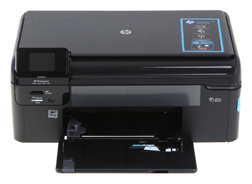
A PrinterInkjet printers are still the most popular for home use. Many inkjet printers can produce excellent quality photo prints and other high definition images, in full colour. Standard or entry level inkjets will perform just this function, and can be picked up inexpensively, although as mentioned can become costly if a large volume of printing is required.

For home office use, many choose to spend a little more on an integrated unit. All-in-one inkjet printers can scan, copy and print, and often fax. These kinds of inkjet printers will understandably cost more initially, but will have similar running costs as more basic models. One point to note with the integrated, all-in-one inkjet is the size of the unit, which is usually considerably larger than the standard type, and can eat up limited desk space.

While cheaper than laser printer toner cartridges, fresh ink cartridges or refills for inkjets will be required more frequently. This can get expensive, especially if a lot of high definition colour images are printed. Producing draft quality prints when definition is not an issue can go some way to reducing ongoing usage costs, and this is particularly viable when printing text.