Cloud services are the future

This is a sponsored post. To find out more about sponsored content on Technology Bloggers, please visit our Privacy Policy.

Rackspace – a leading cloud hosting provider, has recently commissioned a study in association with the centre for Creative and Social Technology (CAST) at Goldsmiths University of London to look into how cloud services have really changed the way we work and play in every aspect of our existence.

The study has revealed that 66% of British people are using cloud based services every day!

The research that has come from this study reveals that (without being fully aware of it) a significant 66% of British users are relying on cloud computing services every day! Check out the image below to see some cool facts and figures relating to how us British use cloud services.

Facts about how British people use cloud based servicesSome of those facts are truly amazing. Almost 20% of people store more that 500gb on ‘cloud’ servers – that’s half a terabyte! My hard disk is a terabyte, and I have currently only used around 250gb of it, (one quarter) therefore that is double what I have on my hard disk, online!

The thing is, crazy figures like this are to be expected as internet speeds rise, disruption decreases and convenience increases. According to Ookla, today, the UK’s average download speed is 11mb/s (megabits – which are 8 times smaller than megabytes) and the USA has an average speed of 12 mb/s. Pretty fast. Upload speeds are a bit lower, with an average of 2mb/s in the UK and almost 3mb/s in the USA.

Other slightly less developed countries like India however have download speeds of just under 2mb/s and upload speeds of around 1mb/s. This is obviously not as good, however still pretty respectable in comparison to the dial-up speeds we used to get, where we couldn’t use the phone at the same time, and were restricted to 56kb/s!

These faster global speeds are making cloud services much more accessible and useful. Cloud technologies are the future, and the introduction of things like iCloud and the Chromebook just seem to reaffirm that.

What’s your view on the above image, is it shocking or to be expected?

Pay As You Go Vs Contract

With a mobile phone (or as my American friends call it, cell phone) you have two main options when choosing how to pay for your minutes, internet and texts. Either pay as you go, or contract.

Pay As You Go

There are various different people offering pay as you go tariffs and deals. Some pay as you go providers are targeted towards those who use their phone more for calling, whilst others focus on those who text a lot. Shop around and you can find a deal that suits you.

Pay As You Go is probably best for those people who use their phone less often. If you spend less than £10 a month on your phone, Pay As You Go is probably the cheaper option for you.

Contract

If you love to use your phone, and it rarely leaves your side then you probably have it on a contract. This means that you get a certain amount of minutes, texts and MB per month. If you are lucky you may even get unlimited on some of them. For this, you pay a fixed monthly fee.

Different mobile phone network providers - Virgin Mobile, Orange, Tesco Mobile, T-Mobile, Vodafone, 3, Talk MobileSometimes you can get a really good deal and get your phone chucked into free! A recent example of this is iPhone 4S contracts, if you take out a contract with some iPhones, you get the phone at a reduced price, or even for free.

Like with pay as you go SIMs, it can often pay to research all the deals on offer, as there are different contracts for different people. If you don’t mind an older model, but can’t stop talking, then there are contracts with unlimited minutes, but no freebies when it comes to the phone itself. Likewise if you really love having the latest model, there are contracts where you can get new phones as they come out, for free!

The only problem with contracts is that the more you want, unfortunately, often the more you have to pay. Yes you can have unlimited monthly calls, texts and internet usage, along with the latest phone, however it can cost you the earth!

It depends who you are as to which you think is best. Both pay as you go and contract deals have their merits, shop around and you are sure to get yourself a good deal that is right for you 🙂

The BOINC Home Network

A few months ago, I wrote about LHC@home 2.0, which is a project that you can get involved in that allows you to use your spare computing capacity to help ‘crunch’ scientific data from the Large Hadron Collider project.

Rather shamefully, at the time of writing the article, I hadn’t actually taken part in the project, however after buying a new PC, I thought that it was my duty to donate my spare processing power to help science!


I started off by going to the SETI@home website, where I worked out that in order to take part in the search for extraterrestrial intelligence (SETI) project, I would need to download the ‘BOINC software’ – so I did. When I installed the software I was amazed with the amount of different projects that I was able to partake in.

The BOINC software is effectively a management tool which lets you choose which projects you want to help crunch data for. Then it sets about downloading, analysing and then uploading the data in the background.

The BIONIC LogoThere are so many great projects that people can get involved in, from looking for extraterrestrial life and the Higgs particle, to projects providing power to those who are doing vital research into malaria, cancers and other important global diseases, and even trying to work out how and why gravity works!

From finding new medicines to helping university students, there really is something for everyone to get involved in.

If you are worried that it may slow down your computer, then don’t be, you can set how much of your processor BIONIC can use, as well as the amount of hard disk space it can take up, and also how it uses your internet.

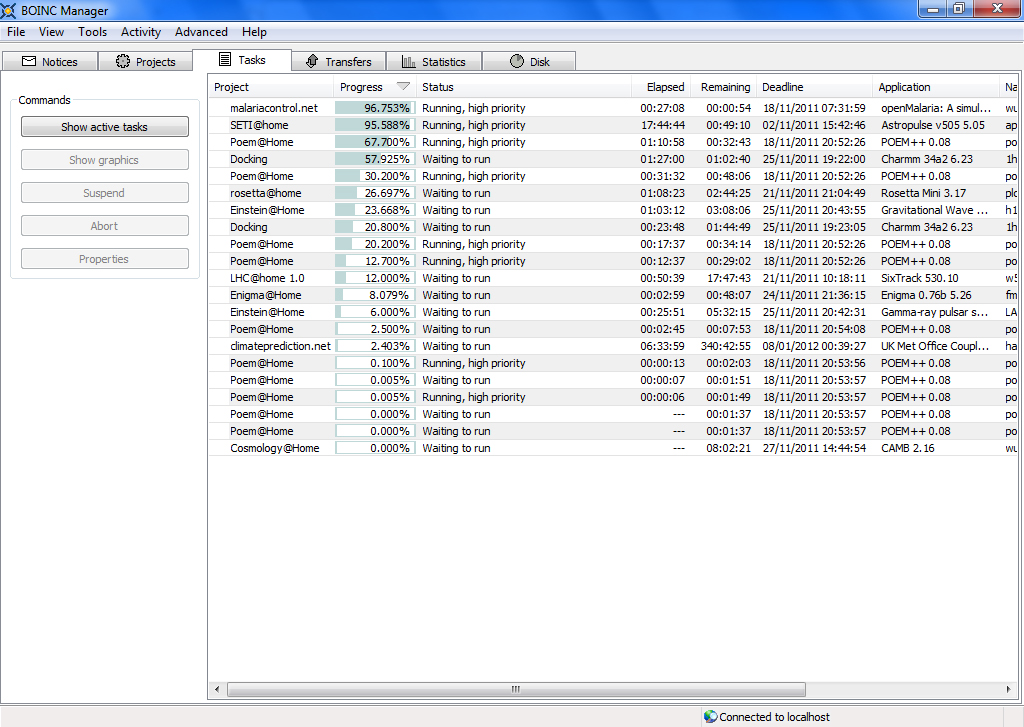
The BOINC software comes with an easy to follow interface, and gives you announces of important events and discoveries relating to @home projects.

The BOINC Manager Interface

The BOINC Manager Interface

Think where we would be in terms of scientific advancements, if everyone were to give just 10% of their PC to some of BOINC’s @home projects.

You can make a difference, and you can help science! Please go to the BOINC website to download the software today, and get stated with some of the brilliant projects they have on offer! I personally believe that the following projects are really worth a look at:

  • Poem@Home – investigating protein structures, how they determine protein function, how they interact with one another, etc.
  • LHC@home 1.0 – the Large Hadron Collider project – with some extra software, you can also take part in LHC@home 2.0
  • climateprediction.net – attempting to improve climate modelling, and predict the possible effects of climate change
  • Einstein@Home – searching through data from the LIGO detectors for evidence of continuous gravitational-wave sources, as well as searching radio telescope data from the Arecibo Observatory for radio pulsars
  • Cosmology@Home – comparing theoretical models of the universe in order to try to improve future technologies
  • malariacontrol.net – helping in the fight against malaria, via creating simulations and models of the history of Malaria
  • SETI@home – analysing data from outer space, to try and find extraterrestrial life

Unfortunately, I now have to give you a warning. Whilst I am sure that the software and projects are all 100% safe to participate in, some organisations would not want you to install them on their computers. You would be perfectly okay to install such projects on your home PC, however I wouldn’t advise that you do it at work or school, as there have been incidences in the past of firms pressing charges against people for increasing their internet usage and filling up there serves by unauthorised software like BOINC.

That aside, I really do urge you to download the BOINC manager today, any start helping science! If this makes the offer any more attractive, most projects have their own screensavers, many of which look pretty cool!

Install it and leave a comment below to let us know how you are getting on 🙂