How to share a mobile broadband connection

With the increase in mobile broadband technology, many people are increasingly turning to mobile dongles (like the ones here) at home instead of traditional connections, which cuts out the need for a fixed-line. However, with mobile broadband there are certain problems that can arise, the most obvious being that of sharing your internet connection with another device.

An O2 dongle pluged into a laptop

A USB dongle – used to remotely connect to the internet

However, that needn’t be something that you become overly concerned with, as these days there are a variety of ways to share your mobile connection.

Most of the top providers are now offering technology to allow you to do this, such as 3 Mobile’s MiFi. With this you simply purchase the 3 MiFi and you’re away. It works pretty much the same way as a dongle, with one difference.

With a dongle you have to plug it into the machine, with MiFi you don’t, and can therefore connect to multiple devices at the same time. The devices themselves are small and easily portable; however, as is often the case with mobile broadband, internet speeds can be a little slower than hardwiring or even traditional Wi-Fi.

This doesn’t just mean you can connect to another Wi-Fi enabled laptops, games consoles or mobile devices, but also other Wi-Fi enabled devices including cameras, such as the Nikon Coolpix and the Kindle, so with MiFi and similar technologies, you can connect any combination of these, up to five devices. You can follow this link for more information on 3’s MiFi device.

A portable Wi-Fi router is another option for sharing the net. These are now relatively inexpensive and quite straightforward to use. You simply connect to a mobile network and share with other devices. However, do shop around before choosing one, as some are better than others.

Internet connection sharing is another option. By connecting a laptop or PC to the internet, you can then share its connection with other devices. For example if you’re running windows 7 this can be done through the network and Sharing Centre, but can be quite complicated  to carry out so is really only useful for advanced users or those who have the time and patience to hit the forums and get step by step instructions.

With different operating systems it works slightly differently so you may have to look up how to do this on yours too, this can be something of a headache.

If you have a 3G enabled phone, you can connect to the 3G broadband connection and then share with other devices. So as long as you have a signal, you can connect to your laptop or another device. However, download speeds are often reduced and quite often you can’t get unlimited data, so if you are sharing a connection you could quickly reach your limit.

The new iPad will allow you to do the same thing, however, despite the device being initially offered as 4G, this technology isn’t yet available in the UK. 4G uses the old terrestrial TV signal waves and widens the spectrum for mobile broadband.

However, Ofcom will be auctioning off the spectrum later in the year and this should be available in 2013 with the top mobile operators and will give even more options for mobile broadband.
PDF Reader Pro App Review

PDF is the most common file format used to share and publish documents. That’s why people always look out for apps that can help them handle PDFs on the go.

PDF Reader Pro lets users download, edit and email PDFs right from their iOS devices. Although a little complicated at first, this tool really is indispensable if you need a reliable way to help you keep on top of your workload.

This app is optimized for use on the iPad but works just as well on the iPhone even if the buttons are a little small.  The file structure is well laid out, organized and easy to navigate. The search facility is fast and comprehensive – looking into all folders inside the app and not just the folder you are in at the time.

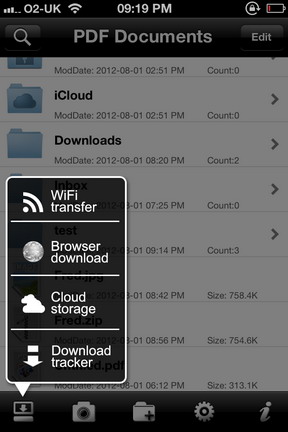
A screenshot of PDF Reader Pro for iPhone and iPad You are able to download single page, as well as full PDF documents, via the in-app browser. It has a scan facility that uses the iOS device’s camera to take pictures of text or pictures and convert them into PDFs. This scan mode is fast and the text is clear and crisp. It also has editing functions to change colors, sharpness, brightness etc. and is something that really adds to the usability of the app.

Once you have scanned or downloaded a PDF, you are able to use a freehand tool to highlight, annotate, mark or just add a personal touch. This is where the bigger screen of the iPad would really help as it can be tricky if you do on the small screen of the iPhone or iPod Touch.

PDF Reader Pro browser downloadThe zip function helps in condensing the size of file; therefore ensuring no extra space is used when saving the documents. Not just able to export, but the app can also import already taken photos from your Photo Albums. The private folder has the option of password protection to ensure security when you are carrying around sensitive information.

As I said PDF Reader Pro has a lot of features. However, the price of this app is slightly on the higher side set at USD 5.99. I think the developer should find a right strategy in terms of pricing to make this app even more successful.

All in all, PDF Reader Pro can help users one who needs quick, on the go, access to a reliable PDF reader, viewer and editor. It is compatible with iPhone, iPod Touch, and iPad and requires iOS 4.2 or later.

Three blog contest winners announced

On the 10th of July, we launched our second competition, which saw three blogs (Technology Bloggers, Blogging Fever and TechAtLast) join together, to give you, the readers of Technology Bloggers the chance to win one of three $50 USD prizes.

The competition was a huge success, with a total of 6,590 entries!

I had initially set a personal target of 10,000 entries, however soon realised this was probably a little out of reach. I changed the target to 5,000 entries which I thought we could just about achieve, however we smashed this, gaining close to 7,000!

Entrants could achieve a total of 59 entries, and then a further 5 entries every day, were they to revisit and share the giveaway again.

In total 342 people took part in the competition, which works out at an average of 19 (19.269) entries per person.

On Saturday I used the Rafflecopter widget to randomly select the winners. The winners were:

  • Asha Marie Pena – winning with her entry “Follow @TecBloggers on Twitter”
  • Peter Lee – winning with her entry “Follow @Blogging_Fever on Twitter”
  • Arjun Yadav – winning with her entry “Subscribe to Blogging Fever Via Email”

Asha, Peter and Arjun all won a $50 USD prize – or equivalent amount – to be paid via PayPal.

Technology Bloggers three blog $150 USD giveaway winnersAsha’s winnings are to be paid by Olawale Daniel and Arjun’s are to0 be paid by Alan Tay.

I was left with Peter, and I have already sent him his winnings – I am unsure whether Alan and Olawale have yet.

Here is what Peter had to say:

“Dear TechnologyBloggers.org, BloggingFever.com and TechAtLast.com,

Congrats to you all for doing such a great contest… it was very well done (especially since all of you are from different corners of the world), easy to enter and I enjoyed it very much.

It is such a pleasant surprise to hear that I am one of the contest winner! I joined the contest because it was organized by my fellow blogging friends, Christopher and Alan. I never thought that I would be one of the lucky winners and become $50 richer. For that, I thank you and keep the contest coming! 🙂

Best wishes,
Peter Lee”

One happy customer 🙂

It is good to see that people from our blogs that won the contest. The loyal readers/subscribers among you will probably recognise Peter Lee. He is a regular reader and often comments. He also reads Alan’s blogs and has his own, called Computer How To Guide. Recognise his avatar?

Peter Lee's Avatar

Peter’s Avatar

Arjun is also a member of the Technology Bloggers community. Arjun first commented on my article about the online profile maker About.Me. He has been a loyal reader ever since, and occasionally drops a comment if he has something to say. Another very worthy winner.

As for Asha, I am unsure how she found out about the contest, maybe she reads Alan’s blog, or maybe she found us on a contest site, or via social media. She could well be a reader who just chooses to lurk, rather than be one who comments. Who knows.

Congratulations to the winners, and thank you very much to everyone who entered, I hope you enjoyed the contest.

Watch this space, as maybe soon we will have another contest on the way…