How to get the most from your fibre optic broadband

While fibre optic internet coverage continues to grow, internet prices are continuing to decrease, meaning it’s never been a better time to upgrade your internet. That being said, if you intend on shelling out on fibre optic, its best you consider how you can ensure you make the most of what you pay for.

Upgrade your wireless router

If your internet supplier has not already provided you with a new wireless router, you may find the need to upgrade to make the most of your new high speed internet. Older routers on the whole tend to be around 50% slower than newer models, meaning investment is paramount if you want to make the most of your fibre optic connection. There is a huge array of routers on the market, with many different features. It’s advised that you go for a dual band router if you have many devices on your network as it will ensure a better connection that is less prone to interference.

Use an Ethernet cable

If you’re after the highest internet and data transferral speeds, connecting via an Ethernet cable is by far your best option. Wireless data is transmitted at a snail pace when compared to a cabled connection, which now has speeds of up to one gigabit on some routers, so really cuts down on the benefit of fibre optic broadband. Though far from practical, having a wired connection will enable you to really make the most of your internet connection.
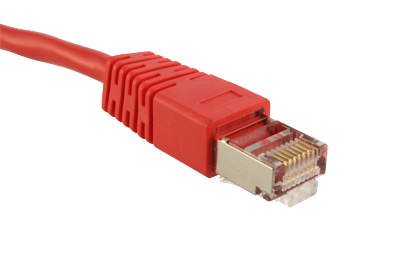
The end of an Ethernet cable

The end of a red Ethernet cable – the colour has no significance, red just makes for a more vibrant image!

If you own a desktop, setup your router nearby so you can always have a wired connection for your PC. If not consider hiding cables in the wall throughout your home so you can have high speed connectivity throughout your home. If done right, it can even make your home more attractive when it comes to selling it!

Set up a media server

Modern hard drives now have functions which enable them to be used and accessed over your network, meaning you don’t need it to be plugged directly into your computer for it to work. Not only is this highly practical, it also allows multiple users to access information at the same time, without the need of cables.

Splash out on modern technology

Many modern devices now have some form of use for wireless internet, so splashing out on the latest devices will mean you can really make the most of your fibre optic connection. Many consoles such as the Xbox 360 or the PlayStation 3 will allow users to stream content from the internet or computer onto the TV. With a high speed connection, you can have many devices operating at full pelt without feeling like your connection is being throttled.

Fun With Faces

If you are looking for a little light entertainment on the web this week I may have a couple of sites for you. Both are related to the way you look, and at how others look at you, and you can participate too.

The first site is called All Look Same. The site contains a type of quiz. You are shown photos of people, places, art etc and you have to decide whether they are from China, Japan of Korea. At the end of the test you are given your result with the appropriate advice regarding learning about other cultures.

The exam room contains 8 different categories, from food to architecture, urban scenery, traditional architecture and modern art, but the really fun one is faces. Can you tell the difference between a Japanese face and that of a person from Korea? Take the test to find out.

Korean, Japanese or Chinese?

Korean, Japanese or Chinese?

There are also a couple of sections of holiday photos that really give a run out to your perception neurons.

The second website is somewhat related as it too deals with faces. The Facity site grew out of a project based in Berlin and Tel Aviv, and now covers a multitude of cities. The idea is simple, a series of photos of faces from an individual city, so why not play a game with your friends, show them a page of faces and try to guess the city.

First you can play with your friends, and then why not participate? There are specifications for the photos but the only rule about joining in is that you must live in the city in question, and there are already 100 cities involved.

The list of cities is interesting because it really shows how communication takes place. The faces tend to be clustered, as I presume groups of friends get together and take the photos and then upload them. Milan has hundreds, as do Berlin and Istanbul, but London only has one, miles behind the mighty city of Robbinsville in New Jersey and Targu Mures in Romania.

Faces of women

Average faces for women around the world

Check out the average face section too, as in the photo above of average women’s faces created through a process of comparing single points in many photos, an interesting project I would say.

So why not add your own? Tell them that Technology Bloggers sent you.

MetaTrader 5 – Android App Review

Most people consider Forex trading as a new way to make some easy money. However, it is a high risk investment. Forex market is very volatile and highly speculative. A 3% change in the value of the currency will make you rich or break you. MetaTrader 5 is one of the popular Forex trading applications available across various platforms. As I had been using its iOS and PC counterparts, I gave a try to MetaTrader 5 for Android.

MetaTrader 5 allows users to connect to a broker, receive quotes, make deals, and check trading history all inside the app and works just like the PC version – only now users can trade on the go and be informed on how all of their trades are going. A good thing about this free app is, it allows users to do all kinds of things and make money and don’t charge anything for them to do it.

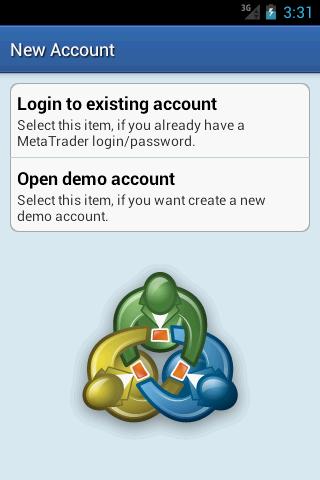
A screenshot of MetaTrader 5

It can tell when you are using a tablet rather than a phone and will adjust its size and charts to fit the needs of the device. Many apps on iOS do this thing seamlessly, but only a few on Android care to do. Everything is set up in a way that everyone can understand and make the best decisions on what they want to buy or sell.

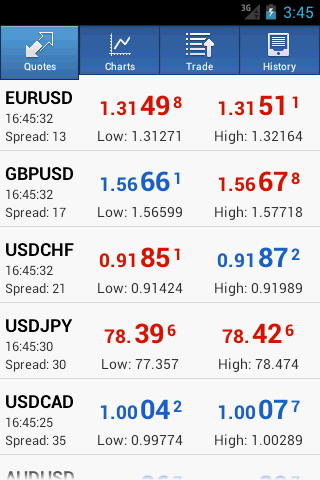
A screenshot of MetaTrader 5 trading stats

Users can connect to their account or create a demo account to run the app. They can also connect multiple accounts to the application at once so that they can buy and sell on different accounts without the need to sign out and sign in to another. The charts are real time and interactive with a zoom and a scroll. Metatrader 5 comes with the 14 most popular indicators to let users keep a watch on markets. On the downside, this app cannot be moved to SD card, so it uses the device memory space. It also consumes a lot of battery life for real time updating.

MetaTrader 5 requires Android 2.2 or up. As I said, this application is also available for Windows PCs and iOS devices. MetaTrader 4 is another interesting option to mobile Forex trading. If time permits I will come up with the review for the same.