This post was going to be entitled “Why you should stop using Internet Explorer” however I didn’t think that was a strong enough title, so I changed it to the direct instruction you see above this text: Stop using Internet Explorer.
You have a choice. You can use Google, Bing, Yahoo! or Ask. You can buy Windows, Mac OS, Chrome OS or Ubuntu. You can go with Apple, Samsung, Sony or RIM.
Although Google dominate the search market, there are still many other search engines out there. Microsoft dominate the computer market, but you can still choose from a [reasonable] selection of other, popular operating systems. You could argue that Samsung now dominate the global smartphone market, but there are still many other companies you can go to to get a smartphone.
You also have a choice as to what browser you use. The internet is arguably now the main function for any computer, so surely you should devote some time then to choosing which browser is right for you?
If you have tried more than three different browsers before, for a considerable length of time and have after weighing up all the pros and cons of each, have chosen your favourite, well done you. If you haven’t, read on.
If you are using Microsoft Internet Explorer (IE), stop. Okay, well you can finish reading the article, but then stop using it. A simple instruction, which could do wonders for your internet experience.
Reasons To Not Use IE
There are many reasons not to use IE. Here is a list of what I think are the strongest arguments against the heavy, slow and outdated browser.
Lack of Security
IE seems to constantly be in the news for its security issues. Much of the malware out there on the internet is only made possible by bugs and holes in Internet Explorer! Need proof? Check out this section of IE’s Wikipedia page.
Speed!
In recent years Microsoft have been really working on making Internet Explorer faster, and IE 9 is much faster than IE 6 or 7 were; granted. That said, it is still much slower than the competition. For example, loading Technology Bloggers from cold (hard refresh) in Firefox, Chrome and Safari took 3 seconds, Opera took 4, while Internet Explorer took 7 seconds.
Lack of Features
Without a doubt, for features, add-ons and extensions, Firefox and Chrome are miles out in front. Safari and Opera also have a reasonable number of things you can add to your browser to customise/improve it, but Internet Explorer has only really started to embrace such features since IE 8. Apart from toolbars, Flash, Adobe Reader etc. IE 6 didn’t really do add-ons.
Inconsistency
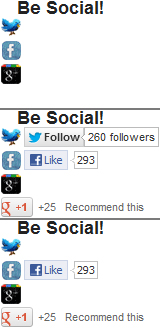
How IE rendered the same code (our social buttons) on three separate page loads – neither is correct.
Take a look at the three images to the right.
Each of the images is a different variation of the social buttons on our sidebar that IE rendered. The screen size remained the same, and the loads were seconds apart.
IE managed to render three completely different versions of the same code. How does that work?
In the first image it didn’t even attempt to load the social buttons before declaring it was finished. It took a better shot in the second image, whilst in the third image it didn’t bother loading Twitter and threw Google+ to the bottom. Why?
Upon loading the blog in Firefox, Chrome, Safari and Opera, I saw the exact same result. Each browser displayed them as they are meant to be displayed, every time – Internet Expolorer didn’t.
Lack of Compatibility with Modern Code
Code is advancing all the time, and a good browser will keep up to date with changes, and make sure it is able to interpret and display modern CSS, HTML, PHP etc.
When the blog snows at Christmas, IE doesn’t show that, IE also doesn’t like the ‘modern’ code which makes our search box work, or the code we use to add shadows to text.
Lack of Compatibility with Older Operating Systems
IE 9 doesn’t work with Windows XP, or any Mac OS or Linux system. Only Vista, 7 and 8 support IE 9. IE 10 only works with Windows 7 and Windows 8. According to StatCounter, in the last 6 months, 26.55% of all computer users used XP, whilst 7.13% used Vista and 7.46% use MacOSX – that’s 41.14% of the market that Microsoft are isolating straight away, and Windows 7 and 8 don’t even own all of the 58.86% share of the market that is left!
Advertising Campaign
Microsoft have recently undergone a quite extensive advertising campaign for IE, to try and shake off its bad reputation. They state how ‘lightning fast’ it is compared to how it used to be, which I can’t dispute. What they don’t however say is how it compares to Chrome or Opera. They also try to reassure users that it is now secure, although that is still debatable!
Which Browser to Use?
There are loads of web browsers out there, check out this handy Wikipedia comparison table to see.
Below is a map showing in 2013 so far, which internet browser is the most commonly used by country.
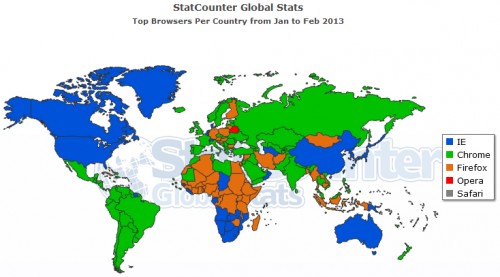
Browser popularity by country. The colour of the country is the colour of the most used browser – see legend.
Personally I would advise using either Chrome or Firefox. If you have a relatively standard, or slow PC, then Chrome is probably best for you. It is light, simple and fast.
I still think that Firefox had more functionality than Chrome, and it is my personal favourite. If your PC is usually pretty quick and of a reasonable spec, then I would recommend Firefox.
Chrome is owned by Google – a multinational corporate giant – whilst Firefox is non-profit and open source.