Nanotechnology, risks and benefits

Last year Hayley posted a really good article on this site entitled ‘What do we need to know about Nanotechnology?‘ She raised some important issues about the governance of such high technology including the facts that little research has been conducted into health implications, legal regulation is minimal and nobody really knows how much of this type of material is produced. It is however already everywhere, in cosmetics, car wax and sunscreen to name but a few.

She followed the post earlier this year with another, ‘Nanobots, the future in Nanotechnology‘. This is also an informative piece in which she describes how nanotech engineering is moving away from top down construction to a bottom up approach, and goes on to talk about the possibility of building autonomous and even self replicating robots on the nano-scale.

Last week I posted an article about synthetic biology, another branch of science that deals in the nano-scale. With synthetic biology one of the issues raised by Hayley, that of power source, is resolved, as the machines are in fact alive and get their power from the organism that they are implanted into. The two are very much related and entwined forms of science.

And all this leads me on to looking at regulation regarding these types of research and a recent publication entitled ‘A Research Strategy for Environmental, Health and Safety Aspects of Engineered Nanotechnologies’.

The document was prepared by the National Research Council and a pre publication copy is available from the National Academic Press for downloaded here.

This is a long and detailed document written with the help of a host of academics, and it raises some very important points about an industry that Barak Obama has placed at the forefront of his innovation policy. In this year’s budget Obama is asking for 123.5 million dollars to invest in nano-tech research, which if seen next to the relatively small investment of 34.8 million in 2005 signals the importance attached to this form of innovation.

Nanobama

But all of this investment is made in a technology that is as yet practically unregulated and severely lacking in health and safety legislation, with the problem being that exposure limits and contamination issues have yet to be formalized. All of this is despite the ever growing use of such particles in our everyday life.

The National Research Council document aims to develop such a research strategy starting from a conceptual framework for considering environmental, health and safety risks, through critical questions to understanding the problem, tools and approaches for identifying properties that may cause risk, resources needed and how to implement the strategy once it has been described.

The document is extremely thought provoking. The fact that safe (or dangerous) exposure levels to such particles have never been determined nor possible environmental release dangers quantified or analyzed seems to paint a picture of an entire industry that operates without a clear understanding of how to manage the risks involved in their work.

This week a rather alarming report was published on the Science News website in which scientists have discovered that exposure to nano-particles changes the way blood vessels in animals behave. They were not using a poisonous substance I might add, but a common compound of nano-particle size.

Now I am not a biologist but I imagine that if it affects mice in this way then it will probably do the same to me.

I would summarize the problem as this; regulation and law making always has a problem when dealing with high technology, lawmaking is a slow process, but technological advancement is not. Laws chase while science runs ahead. But here we are dealing with a serious situation, something is in mass production and use, generating large sums of money but practically unregulated and untested.

The possible up-sides of nanotechnology are enormous, but I would say that the down-sides need to be taken into account too.

For a more in depth debate see my and other’s posts on the Bassetti Foundation website.
Two good registry and PC cleaning tools

To keep your computer clean, inside and out, is often a challenge! I’m not talking about the dust and dirt that tends to accumulate in your computer’s case, but the nasty stuff that tends to cause your computer to become slower, little by little as you use it regularly.

I’m sure this is a problem you are familiar with, you bought a computer and the first thing you notice how fast it is. Everything runs without a hitch and programs are snappy like the beat of a well versed drum.

However 6 months later you start noticing a few things. It first starts out with programs needing to take a couple of extra moments to open, surfing the web starts to become a chore as things feel like they come to a crawl at moments. Even something such as turning on your computer seems to take forever and ever and ever. “This cannot be right!” you have probably thought to yourself, and you are correct!

Much like a motor car, a computer needs their fair amount of touch, love, & care. The problem is, if you are not sure exactly what to do, then you could end up playing around and damaging your computer. This is why, unless you are a PC expert, you should stick to using programs to help you do the fiddling!

The first thing you notice once you start searching for a good, safe, & efficient computer cleaner software is that there are a ton of them, more than you or I could ever count! Being the computer savvy person I am, it’s with the most honorable intent that I present to you the software that I personally feel does the best job. Some PC cleaning software can be dangerous, if it is not well made, or designed to damage your system, you could get negative effects. Check the software has lots of good reviews, if from a trusted source and experts like it, before you go downloading it onto your PC.

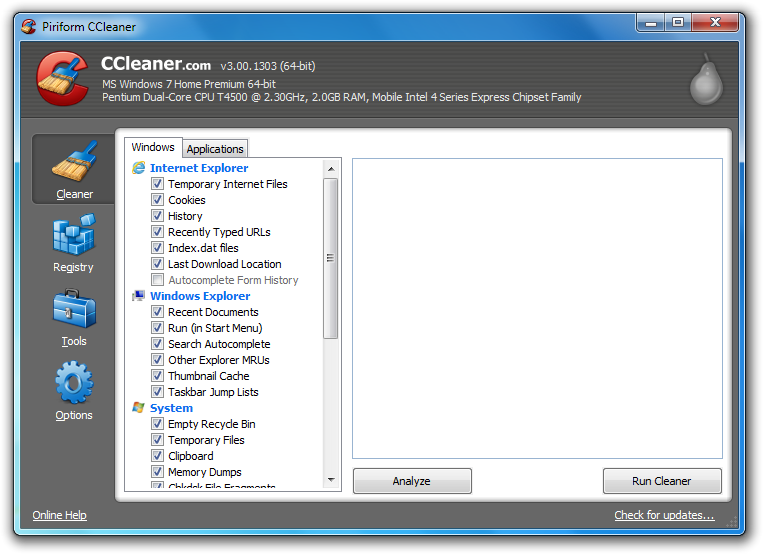
My favorite PC cleaner is CCleaner, which I think is an amazing little program. With a quick and simple Google search it is bound to come up – easily available on internet, if you’re unsure as to where to download it, always try to get it from the official website.

A screenshot of the CCleaner interfaceThis program is super handy because it clears out the majority of junk and trash you have incidentally stored and have hidden away in places you wouldn’t have imagined! When you launch the program you’re going to be presented with a handy onscreen menu; you should select ‘analyze’ and then ‘run cleaner’. Once completed you’ll notice that a whole lot of space on your computer has been freed and a sense of speed has been restored to your machine.

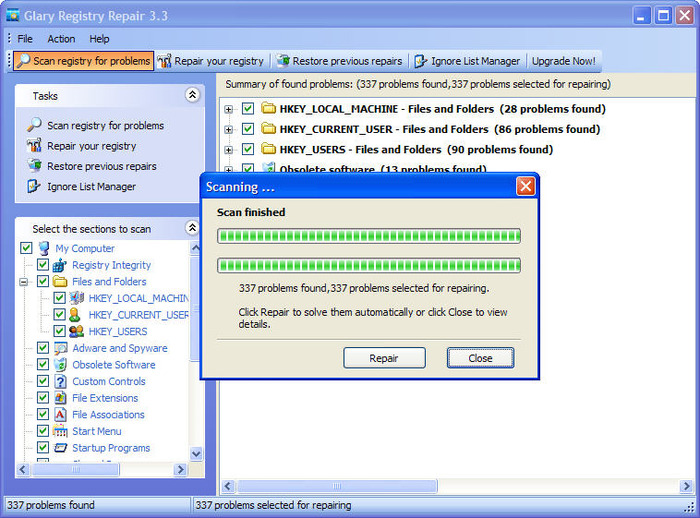
The second program that I would like to recommend is Glary Registry Repair which is a dandy little tool that I highly recommend, because I have seen it perform some truly glorious work.

Mostly everyone has heard of a computer registry, and that at times their registry becomes out of sync due to the programs that they have installed and uninstalled over time making incremental changes as it goes along.

A screenshot of the Glary Registry Repair interfaceGlary Registry Repair attempts to help you spot and fix the errors in your registry, so that your computer can run faster.

There are many different programs that you can use to speed up your computer and clean your registry. These are my personal favorites, however feel free to choose your own.

How to identify prevent and fix laptop overheating

For the last few years, the sale of laptops has increased by 25% whereas the sale of desktop machines has reduced. Along with increasing demand for laptops and a change in times, technology has been upgraded.

Day by day laptops are getting thinner, more compact, lighter, and better in terms of performance. Because of this, laptops are now being put into smaller and smaller casing, which increases the threat of overheating, as there is less room for air to circulate.

If your laptop overheats, it can cause permanent hardware damage or failure. In this article, I will try to teach you about how to identify, prevent and fix laptop overheating.

An overheating laptop

Symptoms of Laptop Overheating

Below are the three points which can help out to identify if your laptop is overheating.

  • Sudden shut-down, done by the operating system to prevent hardware damage
  • The fan speed increases – you should be able to here this
  • A reduction in the laptops performance – things load slower, the CPU is busy more often etc.

The Root Cause of Laptop Overheating

Laptop overheating occurs due to insufficient cooling. This usually happens because either your laptop is clogged up with dust, blocking ventilation, or because a thermal grease compound is getting stocked between your CPU and the heat sink – the big metal cooler that is usually linked to the fan.

Steps to prevent or fix Laptop Overheating

Option 1 – External cooler

You could purchase an external cooler. This is a cooling pad you place your laptop on, and it keeps cool air circulating around the laptop. Before you but a cooling pad, it is important to understand the flow of air in and out of your laptop.

Cooling pads are more useful/effective when used on laptops with air vents on the base of the device. Cooling pad connect via USB, and consumes some of the laptops power – not a problem if you are plugged in. Usually these pads cost around £5-20 GBP.

Option 2 – Get a strong and level base

Most laptops have their ventilation grills on the bottom of the device. Therefore if you keep them on an uneven surface, such as a bed, lap or pillow, disturbance is caused to the airflow. Keeping your laptop on a hard surface, like a table or a strong hard tray is likely to get you good air flow..

Option 3 – Internal cleaning

The above two methods were external methods, however this method will require taking your laptop apart and putting it back together again – so only do it if you are confident you know what you are doing!

This step is about removing your laptops casing to clean out any dust or dirt that might be restricting the airflow. Most laptops have downloadable user manuals, which can tell you all about the internals of your laptop, and how to take it apart, in order to clean it. This can void your warranty, so be careful and do your research! If you are not confident, you could of course take it to your local computer repair shop, and ask them to clean it.

If you are doing it yourself, once you have opened your laptop, you will need to clean the fans which provide cooling to graphics card and CPU. Before you do this, make sure that it is shut down and the battery is removed – don’t electrocute yourself! For thermal grease you may need to use a cotton swab, dipped in stain remover to remover.

For full, comprehensive instructions, research it yourself, and do not start opening your laptop up until you know what you are doing!