Is your computer damaging your eyes?

Do computer screens do any real and lasting damanage to our eyes? There is a lot of debate on this issue, which I am going to explore in this article.


A healthy looking eye

There is no escaping them, screens are everywhere. At home, many of us choose to use computers, games consoles, and televisions – although they all seem to be merging into one.

At work we often are forced to spend hours each day staring at screens in order to get our job done. Word and Excel vs the dreaded filing cabinates, it’s an easy decision for many of us! In schools, many children now use computers more than they use pens and paper. Even when we are on the go, many of us carry phone with us, to keep us up to date and in sync, whilst we are out and about.

Eyes

One must therefore consider: are there any potentially dangerous side effects of using all these devices? We all get headaches from time to time, and computers are probably the cause of some of them. Often, when working at a screen for prolonged periods of time, many of us also get eye strain.

The short term effects of using a PC are unquestionable, but are there any dangerously irreversible long term effects on our eyes? Well according to my research, no, there aren’t. However, there is the possibility for long term effects for other parts of our body.

UPDATE: This article was written in 2011, and whilst there is still no conclusive evidence that suggests prolonged exposure to screens can cause irreversable damage to the eyes, there is a growing body of evidence which suggests that looking at screens too closely and for too often may well cause eye problems in later life.


The eye of someone staring at a computer screen

Posture

Our back and neck are especially vulnerable, due to the large amount of time we spend sitting down in one position. Even with good posture, sitting in the same position for hours on end is not good for your body, that’s why we have muscles, bones and joints!

Repetitive strain injury is also a big issue. Many office workers will at some point experience this, in either their wrists or hands, due to the nature of typing and using a mouse.

In fact, repetitive strain injury is such a big issue, it is estimated that its annual cost to UK industry is between 5 and 20 billion pounds! In the US, the figures are also similar.

Despite its potentially harmful effects on the body, computers cause no proven long term damage to your eyes. Symptoms like sore eyes, blurred vision and a change in colour perception are usually only short term, and clear within hours of leaving the screen.

To help yourself avoid the short term computer-related symptoms of eye strain, my best advice is take regular breaks. Get a drink, go to the loo or just have a wander around every 30-40 minutes and you should be able to avoid such symptoms altogether.

Why not have a break now? Go on, get up from your desk and go and have a wander. 🙂 If you are using a tablet or are on your mobile, take five minutes off and then read another article. 😉

Why not? Your eyes will love you. 🙂
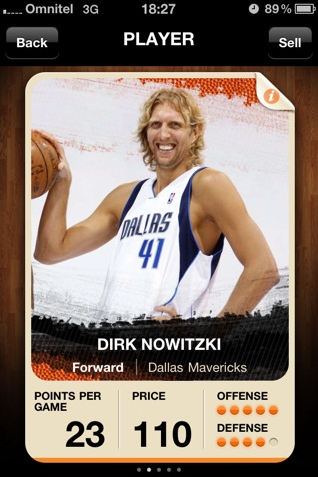
EuroBasket 2011 Cards – Fantasy Basketball Manager iPhone App

The biggest basketball event in Europe is currently going on in Lithuania and as a hoops fan, I was searching for apps in the Apple iTunes Store. That’s when I came across the EuroBasket 2011 Cards iPhone app, a fantasy basketball manager game.

A short disclaimer to begin with, if you are not a basketball fan or if you aren’t acquainted with top European players like Nowitzki, Parker and Gasol, you may find it a little difficult to get a hang of this app. This app has been created with hardcore basketball fans in mind.

Now that I have informed you, let’s come back to the app. The app is based on the EuroBasket 2011 Championship and player’s scores are updated based on their live performances in the court. Once you have installed & opened the app, the UI is pretty simple – name your team, pick your players within the credits allowed and wait for them to perform in the Championship so that the score of your team gets updated based on it.

EuroBasket 2011 Cards iPhone App - Dirk Nowitzki's ProfileNow the trick, as in the case of any fantasy manager app, is with the budget. So you don’t get to pick all the top players. No point in that, right? But what’s more interesting here, is that the ratings of the players are based on their live performances in the EuroBasket championship and this means you’ve got to be on top of all the games, identify the best players and then buy/sell to improve your team’s overall score. Don’t be surprised if you see no scores once you have set your team. The ratings get updated only when your players have played.

So what are you waiting for? Download the EuroBasket 2011 Cards app from iTunes now, for free. Be quick, as the Championship is already in the second round and it ends on the 18th of this month. So don’t miss out on this chance to catch up with the latest basketball action. Make sure you add in comments about your take on this app.

Will iCloud Revolutionize Cloud Computing?

This is a sponsored post. To find out more about sponsored content on Technology Bloggers, please visit our Privacy Policy.

Cloud computing, although only recently becoming more mainstream, has been around for quite awhile and has already done much to revolutionize the way the business world works. The virtual desktop has long been employing Google Docs, which runs on cloud computing, to help with its day-to-day functions, and many employees have been able to enjoy working from home because of the cloud. So why are so many getting worked up over the release of Apple’s iCloud? It’s mainly in the marketing.

As stated before, cloud computing has been around for awhile. Apple has simple brought it into the foreground. What does, however, make iCloud different from other cloud computing services is that it is coming already integrated into Apple’s new operating systems, iOS5 and Mac OS X Lion, which is a pretty cool feature.

The iCloud LogoThe program will immediately sync all of your files to all of your Apple devices allowing you to easily access your iTunes, photos, and other documents from anywhere on whichever Apple device you happen to be carrying at that moment. Although being able to have all your files synced together for free is nice, perhaps the biggest perk of iCloud, is the iTunes feature.

You can upload of your iTunes, and even your zipped files, into your iCloud. Users are then able to swap music and download hundreds of other new tunes. While this seems like an way around pirating music, Apple assures that what iCloud is doing with iTunes is legitimate, and it even cut the music industry a $1 million check to prove so.

What also makes iCloud so attractive is that you can sync everything together for free. The only exception is iTunes which is currently coming with a $25 annual fee when used with iCloud. Not to bad when you consider that you will now have access to hundreds of other iTunes files without having to necessarily pay the higher prices normally associated with individual iTunes songs.

For many, the introduction of iCloud is incredibly exciting simply on a music aspect. However, it will most likely not revolutionize could computing, and will most likely just drive Google to produce something bigger and better. For avid Android users, the iCloud is even more exciting. Google was one of the first to release cloud technologies, and now with Apple ahead of them, the company will be sure to unveil a great product similar to the iCloud with features that iCloud currently lacks.