Online data backup using cloud computing technology

This is a sponsored post on behalf of Bulldog Backup. To find out more about sponsored content on Technology Bloggers, please visit our Privacy Policy.

In the past I have written about cloud computing and how cloud data storage is the future, and at the moment it is playing a key part in backup technologies, as it is now easier than ever before to backup your data online.

One firm that offer online backup services are the Glasgow based Bulldog Backup, they were founded in 2010 and offer backup solutions for both domestic and business users.

I read a statistic the other day that almost 50% of businesses reported a loss of important data in the last two years, probably why more and more firms are investing in online data backup systems!

The good thing is, online backup solutions are getting easier and easier to use, another reason why more and more people are using them. For example, with Bulldog Backup, all you need to is select the package you want to buy, you will then be emailed with your login credentials, then all you need do is login and download the relevant backup client – either Windows or Mac.

When you install your backup software you are asked what you want to backed up, you can choose your entire hard disk, or just a few files – say pictures and music for instance.

Now you may be thinking that online backup storage is a great idea for most people, but you are on a connection which has a limited monthly allowance – say 40 gigabytes, you can’t afford to run the backup system, in fear of going over your allowance.

There is a solution to this too. With most good backup systems nowadays, you can configure how much bandwidth is used for backups, therefore you never go over your limit. You can also choose which files the software should prioritise the backing up of – e.g. give pictures and documents high priority, whilst don’t worry so much about music.

Select how much bandwidth online backup can use

Select how much of your bandwidth Bulldog Backup can use

The best thing is, once you have backed up your files, you can easily access them from anywhere, using your own personal web portal. Bulldog Backup’s portal has a clean layout and is designed to make listening to audio files and viewing images as easy as possible, all as standard. Therefore you can access all your albums whilst out and about, how cool is that! You can also install mobile apps for both iOS and Android, making it even easier for you to access your files on the move.

If you want to go up a level Bulldog Backup offer a ‘Pro’ account which has all of the standard features, with the addition of a ‘SmartDrive’ allowing you to sync files across multiple computers. A SmartDrive is basically a drive that appears like any other hard disk on your computer, only anything you store in it is automatically uploaded to the cloud – a pretty cool bit of tech don’t you think?

A screenshot of a SmartDrive

A screenshot of what the Bulldog Backup SmartDrive looks like – just another hard disk

Okay, so you like the idea of online backup, you can see the potential and benefits, but, what about the costs? Well you may be pleasantly surprised, you can start backing up online with Bulldog Backup from only £2.95 a month ($4.63) with a 1 Terabyte Protect account.

Think that is a good price? I have managed to get a discount promo code which makes the same account cost just £1.25 ($1.96) a month, and that price is fixed for 5 years! Visit the site bulldogbackup.com and use the promo code ‘bullbonanza00’ at the checkout before the 29th of February (this year) to take get started at that rock bottom price 🙂

What do you think about online backup? Will you be investing in it in the near future?
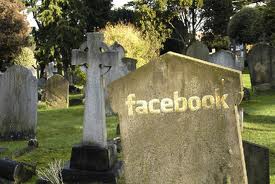
Facebook and the Inevitable End

Facebook is again in the press, this time about its proposed sale, or if you like the sale of the data it has collected about you and me, but Christopher addressed this issue in a post a couple of weeks ago, and I would like to raise another issue involving the mighty corporation.

Facebook state that they have over 800 million registered users, and that more than half of them use their account on any single day. Incredible stuff, it seems they have a lot to sell, but here in the US several states are trying to tackle a serious ethical and moral issue, what happens to their data when users die?

What happens when users die?

In the world about one person in every 113 will die in a year, obviously Facebook is generally used by young people who are relatively rich in that they have access to a computer, so this rate would be much lower, but even taking that into account thousands of Facebook users must die every year.

And that leads me on to the point of this, one of my more morbid posts. If these people haven’t made a will or named a benefactor for their account, what happens to the data? The current legal state of play is this; in the event of a user’s death their next of kin does not have the right to alter or take down their Facebook page. Obviously if they were in possession of the deceased person’s password they could do it (although it might be illegal to do so), but without this information they have no way of removing the data.

This is not only a question of privacy, but also of tact. Many families suffering bereavement do not like to see the deceased’s Facebook page open to the world, or even worse see the photo of their loved one in their ‘friends’ every time they open their own Facebook account. The issue is being addressed in the US with several politicians pushing for legislation that would allow family members access to deceased people’s pages, and Facebook do have a policy on freezing the accounts of dead people but it is a painfully slow process. They require death certificates and other documentation all of which takes time and is probably a very unpleasant experience.

The NC Times and Wall Street Journal both carried articles this week about a young man who posted a picture of himself with a gun in his mouth before commiting suicide and the problems his family had getting the photo removed. It remained for some time and caused a great deal of distress to many people.

On a slightly lighter note you might like the idea of life after death, and fortunately now you can have it, with the new ‘digital afterlife Facebook application’ called If I Die.

Yes you can post on your wall directly from the grave (preparation required while still in life) and communicate with your friends here back on Earth.

I have written about Facebook on a couple of other occasions regarding what I see as far from clear privacy rules, and you can read them here and here if you are interested, and you can download a free will and testament here if you feel you need it.

Here is a short report on the BBC website reporting on the problem.

Movie Awards Trivia iPhone App Review

The Movie Awards Trivia app for the iPhone is a must if you are an Oscars fan. Why? To test out your Academy Awards knowledge, that’s why. The app has almost 1000 questions on the Oscars and I bet you are going to have a blast having a play with this app.

The app has a special offer going on right now, so if you have your iTunes budget available for this month, spare 99 cents and get this app. You won’t regret it. This limited time price drop from $2.99 to 99 cents is on until the 26th of this month and has been done in celebration of the 84th Academy Awards.

movie awards trivia iphone app

Along with 1000 questions to put your mind to test, the app comes with 4000 high quality graphics of your favorite movie stars. To add to that, there are 100 slide shows of Actors, Actresses and Movies from various era.

Each quiz has 20 questions and an option to share them via Facebook or email. There is a count down timer and scores are based on how many right answers you get as most of them are multiple choice questions. There are also filters available for the quizzes to narrow down to your favorite section and this seems like a handy little feature.

There is also a free update promised each academy awards season, so we have to wait until this year’s awards are over to test them out as the app is relatively new, having been launched last December.

Its hard to come up with negatives in a trivia app like this one, that comes with all the necessary items but as with most of them you get jaded after a while. Though this app comes with the great extras like images & slide-shows having almost all multiple choice questions somewhat restricts the fun. I can’t figure out what, but there seems to be some interactive element missing out.

My final verdict, if you are a movies fan, you’ll like this app. If you are an Oscars fan, you’ll like this app or if you are looking for something new to try out, give this one a try.

You can download the Movie Awards Trvia app from the iTunes App Store.