Touchscreen Problems (Zombie Finger)

iPad zombie finger - Touchscreen ProblemsOver the last couple of weeks I have flown from the USA to Britain, then to Italy, and back finally to the USA. I flew on some lovely new Airbus aircraft, but had a constantly recurring problem with the on-board entertainment systems.

The problem is that in the seat above me there is a fantastic touchscreen entertainments system, but my fingers do not work. My son who was sitting next to me has good fingers, he touches the volume section and can turn the sound up or down, but I cannot because the slider does not seem to recognize my body.

So it must be my screen I think, my son leans over and it works perfectly well for him. We swap places, now mine works for him but I still cannot change the volume, this time on a different machine.

It must be me I conclude, but why? Long ago I gave up using anything touchy for this reason. I try licking my hands, warming them up, cleaning the screen but I do not make any progress. So I started looking around the web for some answers to find that I am not the only one, hurrah. There is even a recognized name for the problem in some fields, Zombie Finger!

Touch screens operate in many different ways. At Walker Mobile you can download a free PDF that explains how the different technologies work, but the vast majority of application that we know use one of two approaches. They can be described as Resistive Touch and Projective Capacitance.

Resistive touch is old school analogue. Two surfaces are together, typically one of glass with a thin film over it. You push down on the film and it makes a circuit using a grid of electrical conductors. The system is cheap but being mechanical liable to damage and wear, and it is thick.

Projective Capacitance has no moving parts however, and some of its advantages mean that it is rapidly taking over the market. It is a system that works on capacitance, which is the thing that gives you a shock when you walk over a synthetic carpet and then touch the brass door handle in the hotel that you are staying in.
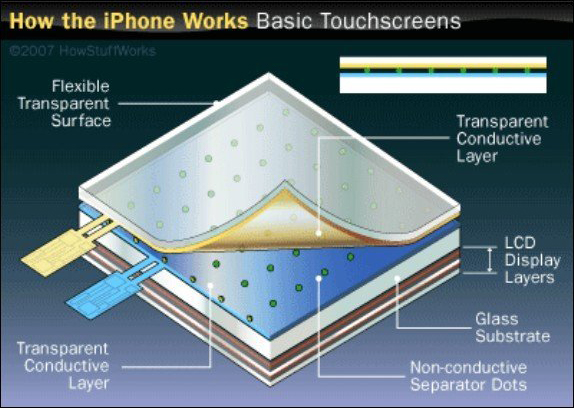
iPhone touch screen technology

How iPhone touch screens work.

Again there are two layers, both charged but to a different extent. When you touch the screen some of the charge is released into your finger, and this tiny change can be measured. And here lies a variable, because the nail will not carry a charge, gloves stop the action and so I wonder if even the state of the skin at the end of the fingers might effect usability. Do I type too much? No charge transfer means no volume.

For a fuller explanation of these 2 competing systems see this article, it is short but extremely informative. I would just like to know if anyone else has issues with touch screens, and if so if they have been able to address the issue in some way. As technology advances this interface is becoming the norm, and we wouldn’t want to leave people with particular skin types behind now, would we?

Asteroid Hunting

Many of you will have seen the video of the meteor that exploded into the atmosphere above Russia last week, and I would just like to offer an overview of the event from a practical scientific prespective.

The meteor was about 15 metres across, and as such too small to detect. As we all saw though a meteor of this size can do extensive damage. It weighed about 7000 metric tonnes, travelling at 18 Km per second and exploded at a height of between 15 and 20 Km. This is pretty close to the ground if you think that an aeroplane flies at about 10Km and we are certainly not dealing with somewhere where nothing happens.

The force of the explosion was about 30 times that of the Hiroshima bomb, a pretty devastating blow by all counts. We should think ourselves lucky that it did not happen over a major city.

Trees blown over after the 1908 impact

Trees blown over after the 1908 meteor impact

In 1908 in Tunguska also in Russia a much larger meteor hit. This one was about the size of the DA14 meteor that flew past Earth later on the same day last week, and it blew trees down over an area of about 2000 square Km. Once again it hit over Siberia so less damage than could have occurred, but if you think that the event of last week over Russia only threw out about 5% of the force of this one than we don’t need much imagination to envisage the possible catastrophe. Several photos are available around the net and I offer one above. There are also plenty of huge craters to see.

NASA have the Near Earth Program, and they have the mission of monitoring the many things that fly close to Earth.

It is not an easy job though as you might imagine, they use ground based telescopes so can only see something that is big enough to reflect enough light, and last week’s hit came directly in line with the sun, so practically impossible to see.

NASA has managed to identify 90% of near Earth asteroids that are more than 1 Km across, and something of this size might threaten life on Earth itself if it hit. There are more than a million near Earth asteroids however that are 20 metres across or more but  very few of these have been identified and mapped.

The B612 Project is hoping to put a telescope into Space before 2018 that will be able to spot something of that size, but until then they will go largely unseen.

Keeping on a related topic last May I put a post up about asteroid mining, and recently the BBC has carried some updates on this project.

It is currently a 2 horse race, but it seems very speculative. And I remember a song about horses of this type.

Advances in Computer Cooling Systems

A few months ago I wrote an article about electricity use in data storage centres, and I want to continue on that theme today. This week Intel announced the results of a year long experiment that involves immersing computers in mineral oil to cool them.

It turns out that the reason these centres use so much electricity is the need to cool the machinery. As this article points out some companies have had the brilliant idea of building their facilities in cold places, so that they can just leave the doors open or use cold seawater to cool the plants, but obviously this does not suit all business plans.

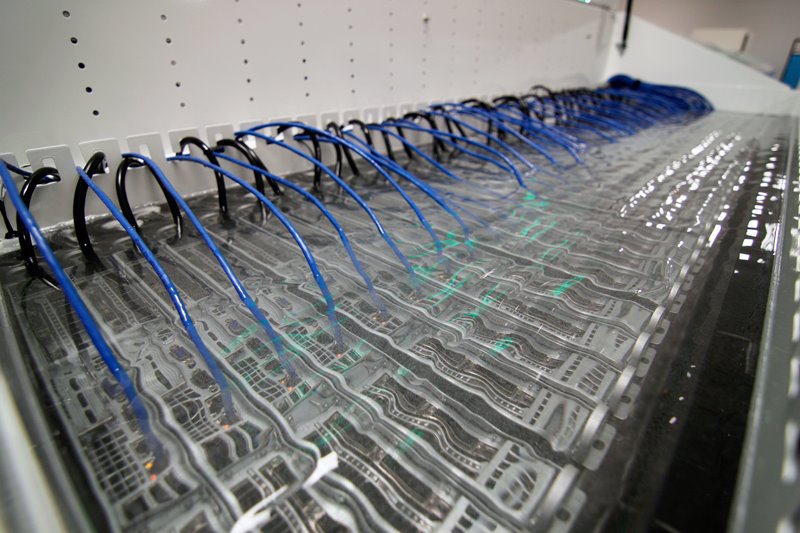
Intel have been immersing their machinery in mineral oil in an attempt to save on electricity. Oil is a better conductor of heat than air so works more efficiently. You just have to remove the fans from the casings and drop the machines in. At the end of this 1 year experiment they found no problems in the machinery due to the immersion. Report in the article linked above.

Computers submerged in mineral oil which acts as a cooling agent

Intel’s experimental oil cooling system

This certainly gives a whole new meaning to the idea of a think-tank.

An organization called Sandia have another idea called a fan-less heat sink. This is a rotating wheel covered in fins that cuts out the use of the fan. They claim that this system is also much more efficient than the old fan system and is not affected by dust as the centrifugal force generated during its use throws it all out. There is an article explaining it here and for a technical explanation see their company website.

If you want to go one step further how about laser cooling? Researchers at Nanyang Technological University have been working on this idea in the hope that they will be able to build microchips that actually cool themselves. Their press release talks about the end of compressors in fridges and air conditioners, a dramatic advantage in energy waste and an end to noisy fans. All published in this month’s Nature science journal.

If all of this has wet your appetite you could try to convert your old computer to a water cooling system. Rather expensive commercially available solutions are available but this blog demonstrates how you can do it all in your own home using just a few things you can buy at your local hardware store. I would recommend that you do not use the computer you are using now though and that you save anything you might want to see again onto another hard drive!

I take no responsibility for damage incurred.