Last year the founder of Monitive.com, Lucian Daniliuc, contacted me, asking if we wanted to run a competition to giveaway 10 Monitive licenses; I accepted and we launched our first ever competition.
I was also given a Monitive account, and have been using it for a year now. In this post I am going to review my experience of the service after a years use.
Latency
One of the main things I use Monitive for is to monitor site response times. Latency is very important, and can have a huge effect on traffic, as the longer people have to wait, the more people you loose before the page loads.
With superfast broadband, many of us are becoming incredibly impatient, and if something isn’t responding, we might ditch a site in a matter of milliseconds.
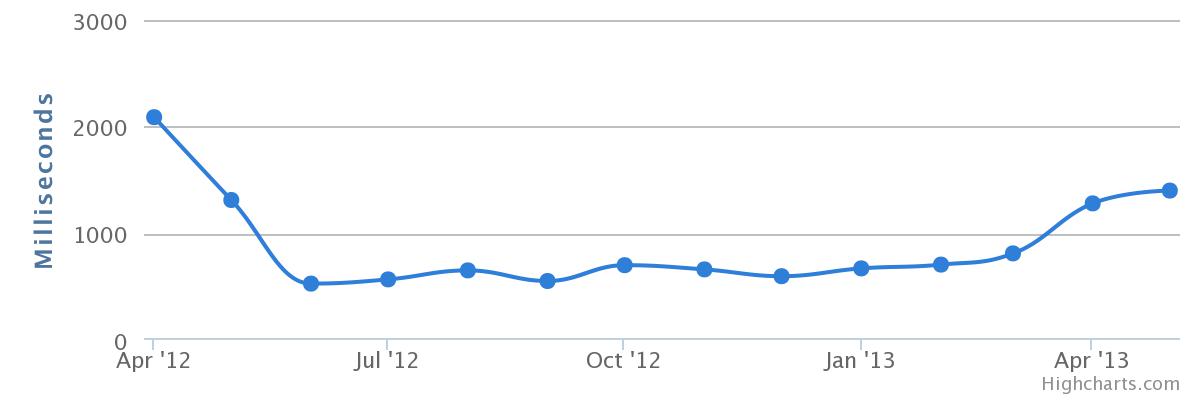
Before using Monitive, I had no idea how long Technology Bloggers took to respond. Monitive allows me to see on a daily basis how long the blog takes to respond, in multiple locations, all around the world. I know that if you live in Liechtenstein or Ireland, the blog on average seems to take around half a second (500 ms) to respond. In the UK it’s about 0.6 seconds, whereas in the USA, it takes just over a second.
This lets me ask the site’s host why the latency varies so much, and ask them what they can do to improve global response times.

A chart showing the average global response times of Technology Bloggers.
Uptime
Whilst response time is important, it has no value if your site is offline. Monitive is accessing Technology Bloggers every 5 minutes from hundreds of locations around the world, to ensure that the site is live and accessible. If the blog goes offline for more than 3 minutes, I am sent an email. These are my personal settings, you can make checks/notifications more/less frequent, and can get notified via SMS and Twitter.
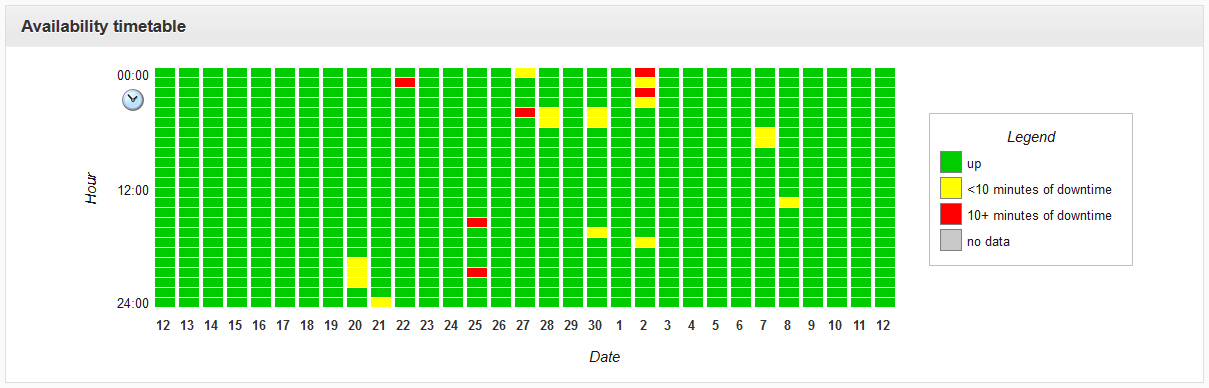
Quite disappointingly I report that Technology Bloggers went offline 23 times in the last 30 days. During this period, you couldn’t access the site for more than 10 minutes on 6 occasions. If I wasn’t using Monitive, I would only have spotted one or two of these outages myself. I can now report these to the site’s host, and ask why the site has gone offline so many times.

A chart of the uptime and downtime Technology Bloggers experienced in April/May 2013.
Unless you pay for load balancing, to mirror your site on various servers across the world, and effectively distribute traffic, to ensure 100% uptime, you should expect some downtime. It is expected that most sites will have some go down at some point, however how frequently this happens, and how long they remain offline for is something to consider.
We have a 99.9% uptime guarantee on the blog, yet this year so far, uptime has been 99.85%, meaning around five hours of downtime has occurred this year already.
Improvements
One thing I don’t like about the service is that it doesn’t allow on demand checks. I think it would be very useful to be able to check the status (including response time) of a site at a desired location, whenever you want; but as of yet, this can’t be done.
As I have set Monitive to check the blog every 5 minutes, and then notify me after 3 minutes of downtime, it can be a while before the system updates. For example, if the site is checked at 13:00 and at 13:01 I check and the site is down, it wont be checked again until 13:05, and I wont be notified until 13:08. In such a situation, being able to check the current status, could be useful.
Chadrack
One of the winners of our Monitive competition was Chadrack Irobogo. I asked him what he thought of the service.
“I can say, it was great because throughout the period I was able to know what was going on with my site. Before then, I really did not know anything about site monitoring. It was during the use of this program I learned when my blog was either down or up. And all of these was done without my doing anything. Unfortunately, I cant really give any details about the program. Only thing I can say is, it is really good.”
I agree with Chadrack on his point about the service being an eye opener to downtime. I really didn’t understand how often sites go down, even if only for very short periods of time.
Like Chadrack, Monitive is the first commercial website monitoring service I have used, so I don’t know how Monitive compares to its competitors. I am however suitable impressed by their services to want to keep using them.
If you are interested in Monitive’s services, do check out their uptime monitoring website. I have found website monitoring very useful, and am thankful to Monitive for my license, and for giving us prizes for our competition last year.